Layer7 is a reverse proxy and WAF that scores every request at our edge and passes clean traffic to your origin.
It starts working the moment you point DNS at it.
1.0 Defaults
Protected at request one
Mitigation engages from the first request, not after your error rate crosses some threshold.
2.0 Philosophy
No rate limiting
Every request is scored on its own instead, so real users keep full speed in the middle of an attack.
3.0 Plans
Same protection on every plan
Free included. Paying buys control on top, never a stronger defense.
4.0 Origin
An origin that stays hidden
Origin-side mTLS by default, rotated on a schedule. A leaked IP still has to prove it came from our edge.
Chaos in. Clean traffic out.
01
Fingerprint
Each connection's TLS fingerprint is checked against the browser the client claims to be.
RequestGET /login
ClaimsChrome 130 · Windows
TLS JA4
Fingerprint ≠ browser
The client says it's Chrome 130 on Windows. Its TLS handshake says otherwise.
02
Score
Header consistency and request cadence are weighed together, request by request.
Real users
Request cadence
Request cadence is machine-regular
Header order inconsistent with the claimed browser
03
Decide
Pass, challenge, or drop. Real users never see a wall.
04
Forward
Clean traffic reaches your origin over mTLS, so a leaked origin IP isn't a way around us.
An origin that stays hidden
Origin-side mTLS by default, rotated on a schedule. A leaked IP still has to prove it came from our edge.
Where this runs today. While we build our own scrubbing network, Layer7 runs on Cloudflare's serverless edge. To be clear about who does what: Cloudflare's application-layer mitigation and bot protection are switched off for the traffic we handle. Everything that judges your traffic, the scoring, the challenges, the rules, is Layer7's engine. When our network comes online, your setup won't change.
Sep 27, 2026 · Layer 7 · Platform record
1.99 million requests a second.
Requests
228.8 million
Source IPs
10,000+
Traffic
1.09 TB
Duration
four minutes
Reached the origin
310
Filtered at the edge
99.9998%
Hitting our edgeReaching your origin
0:000:004:00
The record.
Attacks absorbed, with the numbers. Entries before 2026 come from the network R&D that became this product.
Aug 23, 2026Layer 7975k requests / sec115.6 million requests in one flood. 84 reached the origin.
Aug 21, 2026Layer 7670k requests / sec125.8 million requests in one flood. 22 reached the origin.
May 10, 2025Layer 42.62B packets / secPeaked at 1.4 terabytes per second over a three-minute burst, with no disruption or packet loss.
Apr 26, 2025Layer 41B packets / secAveraged nearly a billion packets per second for 16 minutes straight, without disruption.
Mar 22, 2025Layer 715M requests / secA Meris-based attack on WHMCS. Over 99.99% filtered, using proof-of-work and zero rate limiting.
Our position
A rate limit throttles your real users at the worst possible moment and calls it mitigation. We don't believe in them.
With a rate limit
0 real users throttled
Real users get throttled along with the attack
It bites hardest when you're under the most load
Volume alone decides who gets through
With Layer7
0 real users throttled
Each request is judged on its own
Real users keep full speed during an attack
No thresholds to tune
Every verdict, explained.
The dashboard shows what was blocked, what was challenged, and why, down to a single request.
Services / play.meridianhost.io / Session lookup
Session a3f9c2e17b04d5e8Blocked at the edge
Request
Request
GET /login
Host
play.meridianhost.io
Protocol
HTTP/1.1
Client IP
203.0.113.77
Network
AS64500 · Example Hosting
Time
01:12:44 UTC
User agent
Mozilla/5.0 (Windows NT 10.0; Win64; x64) AppleWebKit/537.36 (KHTML, like Gecko) Chrome/130.0.0.0 Safari/537.36
Verdict
Blocked
Decided at the edge. The request never reached your origin.
Action
Dropped
Decided by
Scoring
Rule matched
None
Fingerprints
JA4
t13d1715h1_5b57614c22b0_3d5424432f57
JA4H
ge11nn05enus_9ed1ff1f7b03_cd8dafe26982
The client says it's Chrome 130 on Windows. Its TLS handshake says otherwise.
Signals
TLS fingerprint doesn't match Chrome 130
Header order inconsistent with the claimed browser
Request cadence is machine-regular
No allow rule matched
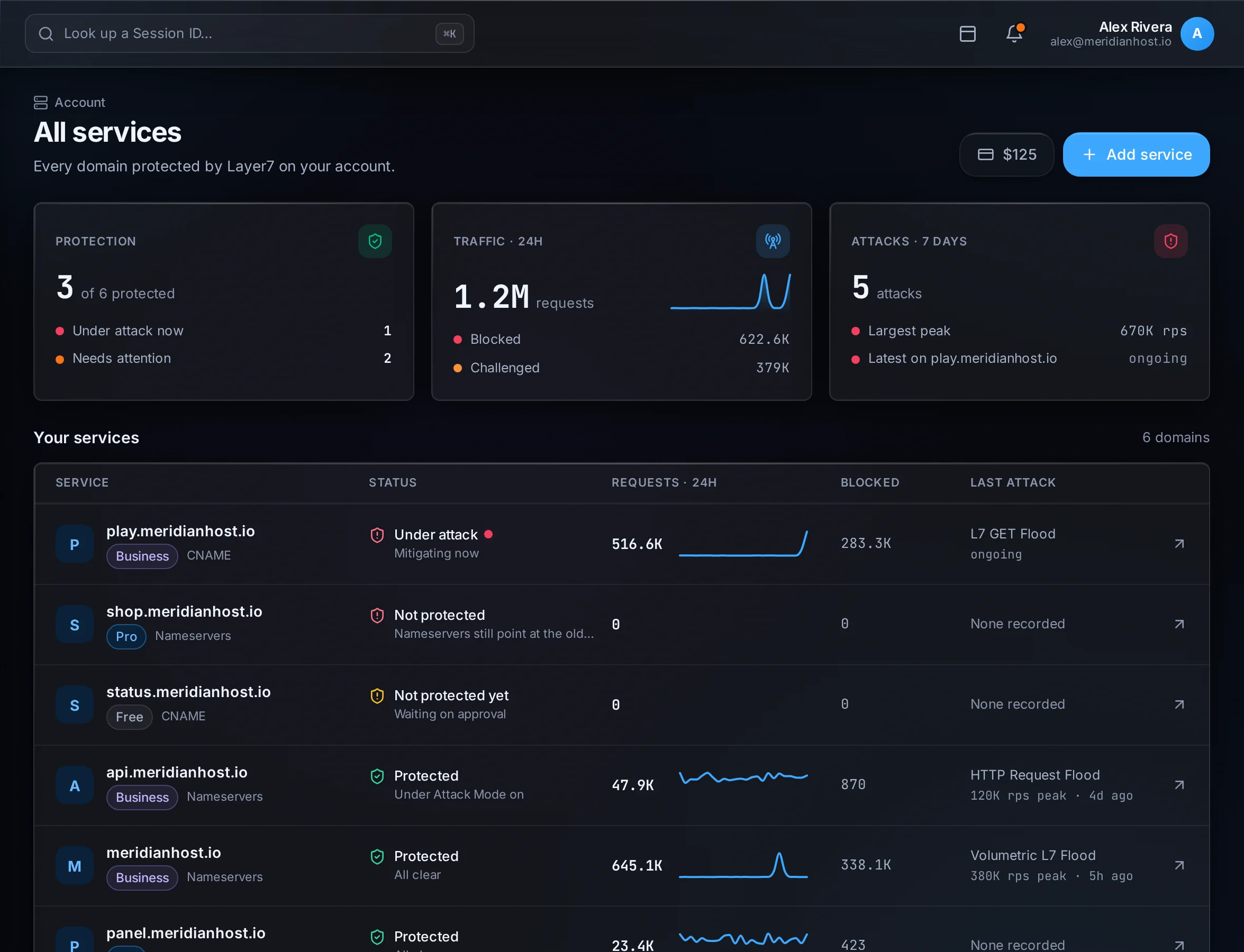
Every protected domain, its status, and its last attack, on one screen.
Two ways to connect.
Both get the same mitigation. The difference is how much of your DNS we handle.
Layer7 DNS · example.comDelegated
TypeNameContent
A@203.0.113.10Protected
CNAMEwwwexample.comProtected
Aapi203.0.113.24Protected
Nameserver setup Recommended
Delegate your domain to Layer7 nameservers and manage DNS in the dashboard like normal, with mitigation on top.
Covers the whole domain: apex and every subdomain
Full DNS management in the Layer7 dashboard
Nameserver changes can take hours to propagate
Requires a paid plan, Pro or above
; your DNS providerwww.example.com. CNAME protect.l7.gg.# keep every other record where it iswww.example.com is protected
CNAME setup
Keep your DNS where it is. Point a hostname at your Layer7 target and it's protected.
Works from any DNS provider, nothing to delegate
Covers the hostnames you point, up to your plan's allowance
The apex needs CNAME flattening at your DNS host
Available on every plan, free included
Pay for control, not protection.
Priced per protected domain, billed monthly. Mix plans across domains. The defense is identical on every plan.